HUANUO’s FlowLift Single Monitor Arm: Clean Desk, Better Ergonomics
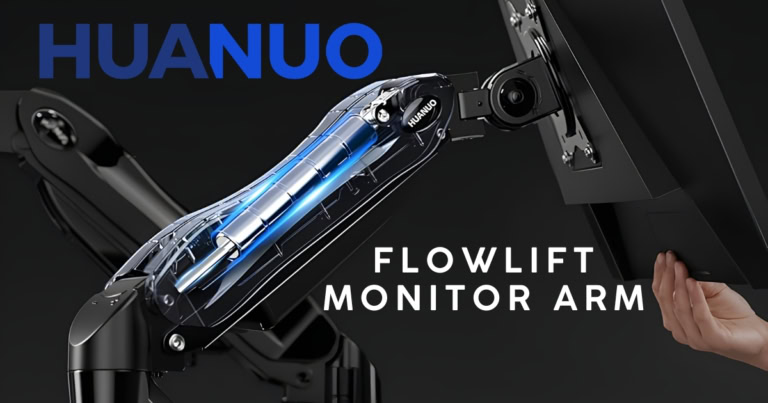
Never in my life did I think I would be talking about monitor arms, and yet here we are. For so many of us writers (or really anyone who spends a significant amount of time on the computer) here on the internet, we need to start thinking and talking about desk setups and ways to make our lives easier. Not just easier, but safer, as it’s not long into a day of typing before my entire body hurts to some degree, and I know I’m not the only one out there feeling it. Now is the time to find ways to reduce the unnecessary stress so many computer users feel daily, such as with the HUANUO FlowLift monitor arm.
I know what you’re thinking: how important is it really to have a monitor arm for my computer? Believe me, I was in the same boat, sitting at my desk with all my equipment the same as the day I took it out of the box, and my back and neck were paying for it. While monitor arms rarely receive the same attention as mechanical keyboards, gaming mice, or ultrawide displays, they are perhaps the most essential piece of tech equipment you may ever purchase. A quality monitor arm doesn’t speed up your computer or make your display sharper, but it can dramatically improve comfort, organization, and flexibility.
On paper, the HUANUO FlowLift promises exactly that: a modern mechanical spring design, wide compatibility with monitors up to 32 inches, clean cable management, and an installation process approachable enough for first-time buyers, which is one of the most important things in my book. However, it also delivers on the change to all those body aches that come from technology and spending too much time in one position. So, have I been a part of the conversation about better ergonomics in the creative field before now? No, but now you might not catch me shutting up about it.
[Note: While I am reviewing this item independently and honestly, it should be noted that I received the Flowlift from HUANUO for the purpose of this review.]
The HUANUO Flowlift out of the box
I’m going to be honest with you, viewers, as I have been with every review I give you: I got overwhelmed when I first opened this monitor arm. Most of the pieces that I’ve sampled have come assembled, and the Flowlift monitor arm was anything but. It also shouldn’t come as too much of a surprise that I’m not exactly the most handy person there is. Do I own power tools? Yes. How often do I use them? That’s a question for the dust on them to answer.
So when I opened the box and saw the arm in pieces, with bags of hardware required to assemble it, I didn’t know what to do. Yes, it came with instructions on how to piece it together, and yes, I was able to read and comprehend well above grade level at a young age; however, I’m still a guy, and at times unable to follow simple instructions. All jokes aside, there was a piece of me that felt my heart beat quicker as the anxiety set in, and I told myself I’d work on that another day as I gently closed the box.
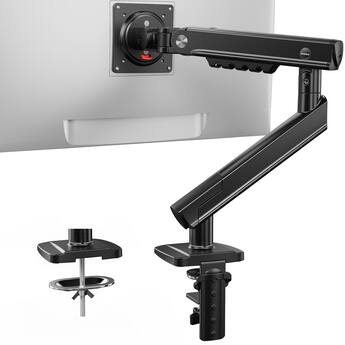
If I had actually taken a moment to pull everything out and look over the guide HUANUO provides, I would have seen that it isn’t nearly as difficult as it may look at first. Instead, it comes together rather quickly, snapping into place in minutes rather than the hours I was dreading. Perhaps the most difficult part is attaching the arm itself to your monitor, but even that is easily resolved in minutes, rather than feeling like you need a degree in engineering to use it.
Included in the box with the arm itself is the necessary hardware for both C-clamp and grommet mounting, covering whatever desk configuration you may have. This felt like an important touch, as this shows that HUANUO isn’t making this for a specific person but wants its monitor arm to be universal for all.
As you assemble the Flowlift monitor arm, you come to appreciate the care HUANUO has put into making this product. It doesn’t feel like an inexpensive accessory assembled from thin sheet metal, as the arm has a reassuring heft and rigidity. You don’t have to fret about whether this arm can truly support the weight of your monitor, as you know in moments that the Flowlift is up for the task. Once mounted, the arm immediately feels secure.
This is also a piece of equipment that is supposed to blend into the background of whatever computer setup you have, as the Flowlift features an industrial design with a matte black finish. The arm avoids unnecessary styling flourishes, instead favoring clean lines and subtle curves. It looks modern without being flashy, making it suitable for whatever you need. It’s professional without being boring, but subtle enough that it won’t feel cold in whatever gaming setup you may have.
The only part of this process that may require patience, aside from attaching your arm to the monitor, is balancing the arm after installation. Like many spring-assisted monitor arms, proper tension adjustment is essential for smooth operation. Fortunately, it doesn’t take too long to complete this process, although it can be annoying to fine-tune it; however, once dialed in, the arm reliably maintains its position.
Using the Flowlift monitor arm
So now that the arm is assembled and my monitor is firmly attached, you might be wondering how practical it actually is. Those who have worked with any type of technology arms know that they aren’t always the smoothest to work with. My microphone at my desk has a boom arm whose movement feels stiff, jerky, and absolutely inconsistent. I’ve become accustomed to just swinging the arm in a big circle instead of moving it in any other direction, because it can be a hassle to place it where you truly want it. However, that problem seems almost nonexistent with the FlowLift arm.
The mechanical spring system produces movement that feels considerably smoother than expected for its price class. Raising the monitor requires minimal effort, while lowering it feels controlled rather than abrupt.
Horizontal repositioning is similarly fluid, allowing users to shift between focused work and collaborative viewing without wrestling with the hardware. It doesn’t feel like you have to exert significant effort in any direction to get the FlowLift into place, which is a huge win for a monitor arm like this one. It also feels stable regardless of how you manipulate it, with joints that don’t flex, which means less wobble. Meaning that it moves when you want it to and maintains its place effectively when you don’t.
This may sound like a basic expectation for a product like this, but anyone who has used similar equipment will know how frustrating it can be to move the arms fluidly, consistently, and without issues or sagging. So that’s a massive win in my book.
The ergonomics of this arm from HUANUO
I began this article by getting on my soapbox and preaching about how important proper ergonomics is for your physical and mental health, which it totally is. As a psychologist, I’m always thinking about what’s best for myself and those around me when it comes to the latter, but it never crossed my mind to think about how my monitor’s position was impacting how I was feeling. I was constantly having headaches, lower back pain, and nerve tingling that would radiate up my arms. All of it stemmed from how I was typing on my computer, but more importantly, from how I was positioned to stare at my screen.
For most people, their monitors are either far too low or too high on their desks, leading to poor posture and unnecessary strain on their necks. However, the FlowLift makes proper monitor positioning almost effortless and within seconds.
Tired of sitting in your chair and need to stand for a while? You can easily raise the display and continue on with your work. Switching from editing documents to drawing with a graphics tablet? Reposition the monitor accordingly. Truly, the ways you can move and adjust your position with this monitor arm feel endless. Whether you’re changing up the orientation or moving the arm around your desk, you can find the spot that suits you best without too much trouble.
Final thoughts on the HUANUO FlowLift monitor arm
For most 13- to 32-inch monitors, the FlowLift monitor arm might be a great purchase. Not only does it help reduce stress and pain, but it also cleans up your desk and gives your space a minimalist aesthetic. This will change your life, not to sound incredibly dramatic.
But there are some drawbacks. If you have a larger monitor or one that is heavier than standard, this product won’t work (well) for you. While it features a cable management system, it’s on the smaller side, so it might not solve all of your problems.
That being said, the positives far outweigh the negatives when it comes to the FlowLift monitor arm, as this is truly a game changer. This is a practical piece of equipment; it’s not meant to be flashy or look impressive, but rather to help clean up your space and improve ergonomics. HUANUO has created something that concentrates on the fundamentals, such as stability, ease of adjustment, ergonomic flexibility, and clean workspace organization.
For students, remote workers, programmers, content creators, and gamers looking to upgrade their workspace without overspending, the FlowLift strikes an impressive balance between functionality and value, which is the corner in which I think all technology should live.
The FlowLift monitor arm is available now from HUANUO!
Also check out: The Analogue 3D Brings Nostalgia With Cutting-Edge Tech