YoloCam S3 Review: A Webcam with a Cinematic Upgrade
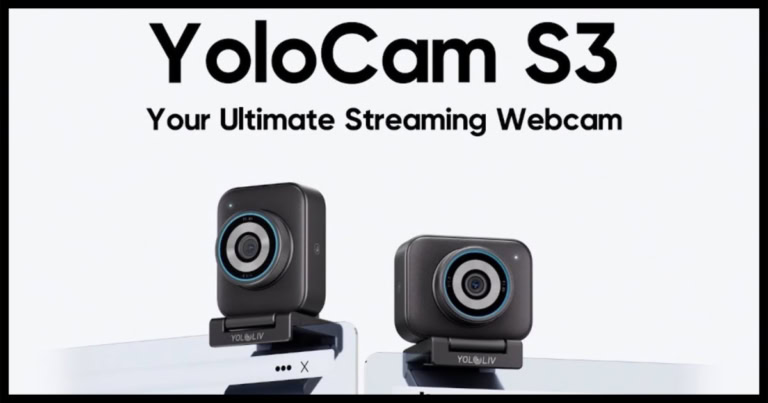
In a world dominated by more webcam choices than you can possibly ever research, where does one begin to make the right choice? As the years go by, the technological differences between companies grow ever slimmer, meaning that regardless of your choice, you can’t possibly make a bad one. Right? Now, if you’re like me, you know that’s probably true, but that doesn’t stop you from the relentless search for the best technology on the market, which also happens to have the best price tag. Cue Yololiv and their newest webcam, the YoloCam S3, ready to be your next technological advancement for your streaming setup!
As a tech start-up, YoloLiv aims to bring consumers the best hardware, software, and applications currently available. As stated on their website, their mission is to make streaming equipment accessible that looks and feels professional. Which as an avid podcaster and interviewer, it puts my mind at ease.
I need equipment that’s going to work with me and for me, not cause me any difficulties. I need to look and sound professional, which requires technology that will achieve a seamless recording. Something that any streamer or podcaster knows quite intimately. I’m here to help with those decisions, as I’ve put the YoloCam S3 through the wringer to see just how well it can keep up with the busy recording life I live.
[Note: while I am reviewing this item independently and honestly, it should be noted that I received the YoloCam S3 from YoloLiv for the purpose of this review. You can find Brian’s podcast on YouTube at @bsb.insider]
Out of the box: the YoloCam S3 feels premium without the frills
I feel like each time I receive a new camera to review, I have the same thought: “Wow, this package is small.” Not to make that sound like a negative about the webcam in front of me, but it’s more of a statement about the direction in which technology has been heading. I remember back in the day, when webcams were bulky units that barely balanced on the top of your computer, and now the box they come in is barely bigger than my phone.
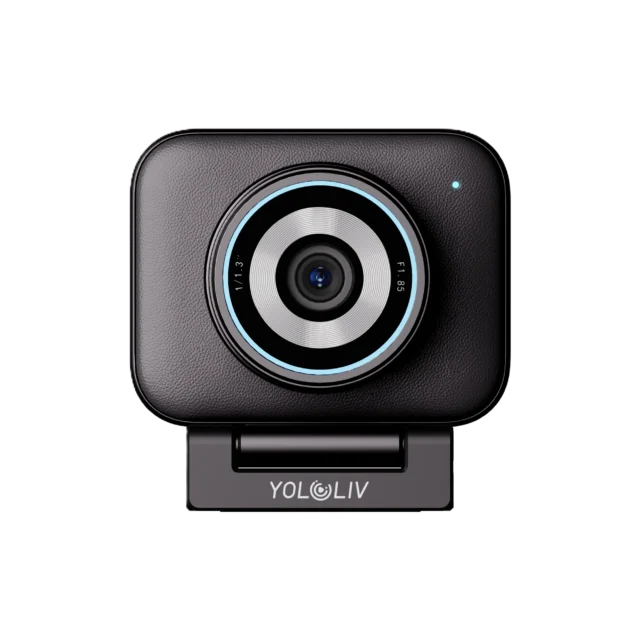
However, as you open the box of the YoloCam S3, you notice something entirely different about this webcam; it doesn’t feel or look like so many other cameras on the market. Plenty of cameras I’ve used throughout my lifetime have come in glossy plastic and oversized branding; however, the YoloCam S3 features a minimalist design, with a sleek aluminum body that gives it a professional camera feel, rather than just another piece of standard office hardware.
I won’t lie, while the box is small compared to other brands, the S3 doesn’t feel cheap or insignificant once you get your hands on the actual camera.
Sturdy is the word that comes to mind immediately. This camera is unbelievably sturdy, proving that good things come in small packages. The camera itself is no bigger than my palm, although my palm is perhaps larger than most people’s. And it’s sleek with that metallic body that looks professional atop your computer. It also comes with a magnetic mount, making positioning easier than the awkward clip systems found on many webcams.
The YoloCam S3 also doesn’t rely on gimmicks, as it isn’t exactly a camera meant to be flashy. It doesn’t come with RGB lighting or is made to look pretty on camera (although sometimes I wonder why cameras need to look flashy, as no one but the person using them will ever truly see them). This camera looks professional enough for any setting, whether you’re using it for work or personal use. However, the real story starts once you turn it on.
YoloCam S3 is bringing the heat for high-quality images!
The setup of the YoloCam S3 was so easy and intuitive that it almost doesn’t warrant mentioning. Truly, it was as simple as plugging the camera into the computer, and I was off to the races. I didn’t have to download anything to make it run, and I didn’t have to get frustrated as I struggled to pair it with my desktop. Instead, as I booted up Riverside for a long day of recording podcast episodes and interviews, it was just ready to go. Everyone can breathe a sigh of relief with me, as I know that it can be a huge hurdle to overcome with plenty of other cameras. But with the YoloCam S3? It was simple.
However, perhaps the strongest feature of the YoloCam S3’s is unquestionably its image quality. I’m sure many of you reading this remember the days of blurry cameras and low resolution. I can feel my eye twitching at the thought. Even to this day, there are still cameras on the market that struggle with image quality because of tiny sensors that can’t properly capture light, detail, or depth. The S3 avoids this problem by using an Ultra-Large 1/1.3-inch CMOS, which is significantly larger than what you’ll find in standard webcams.
And let me tell you, readers, the difference is immediately noticeable. As soon as I joined a studio room, the video appeared sharper, cleaner, and more natural-looking, rather than flat. Skin tones generally look realistic, textures remain detailed, and backgrounds gain a subtle natural blur, giving the footage a more cinematic feel.
This is especially important for streamers, teachers, or any professionals who spend hours on camera. The S3 creates a sense of visual depth that cheaper webcams simply cannot replicate. It genuinely puts you front and center without feeling disruptive in any way. With 4K resolution, the image is impressively crisp. All details remain sharp, even when scaled down to 1080p for livestreams or video calls.
The YoloCam S3 also supports 1080p at 60 frames per second, which is particularly useful for gaming streams and motion-heavy content. Movement appears smoother and more responsive compared to standard 30fps webcams. Another way that YoloLiv has thought of every consumer when making their product.
Other features that make this YoloLiv product great
As someone who films from various places, be it my home studio or the many offices where I see clients, lighting can be a challenge. Sure, I have some tricks, such as a light that does travel around with me, but it all adds up to extra equipment to remember, or more importantly, remember to charge up. However, low-light performance is one of the areas where the YoloCam S3 truly excels.
We’ve all been there: recording as natural light fades, and the picture becomes super grainy, to the point of being blurry. It looks as good as those selfies on your Motorola Razr from back in the day, and there doesn’t seem to be much you can do about it, sans artificial lighting that can make you look incredibly harsh. However, because of the previously mentioned sensor and improved light handling, that didn’t seem to be a problem for the YoloCam S3.
In dim rooms, such as my office, the camera still retained crystal clear details while avoiding becoming muddy or hazy. That’s not to say it completely replaces studio lighting, as I do think you can’t go wrong with a warm, low light to help highlight the picture; it does a far better job handling imperfect lighting conditions than most webcams in its price range. This is a game-changer for those who mostly stream at night, work in home offices with poor lighting, or aren’t ready to make that expensive lighting equipment purchase.
The YoloCam S3 also features autofocus, which personally can be a pain at times. There will be plenty of times when I’m sitting stock still in frame, and my camera will struggle to focus on my face. Furthermore, as someone who can get easily spooked by the prospect of supernatural entities, I’d hate for the camera to focus on a face that isn’t present. Fortunately, the YoloCam S3 performs well above expectations in this area.
Both the face tracking and autofocus features responded quickly to changes, flowing fluidly without feeling uncanny. The camera locks onto subjects effectively and maintains focus with minimal pulsing or distracting adjustments. Whether you leaned toward the camera, shifted position, or moved around slightly, the focus remained stable for the most part. For creators such as myself, who shift frequently, talks with my hands, and attempt to be dynamic behind the camera, this proves not just helpful but essential.
However, that doesn’t mean there aren’t still some issues with the autofocus and face tracking. Depending on how dark a room was, there were some difficulties locating my face, or that it drifted off me. These instances were slim, and as long as proper light was present, there wasn’t much of a problem.
Finetuning your webcam experience
I, personally, didn’t experience any issues with the camera straight out of the box; however, for those looking for more personalization, YoloLiv has you covered. Thanks to their software, you can manually control many aspects of the camera. You can adjust exposure, white balance, sharpness, saturation, and focus settings through the software, allowing you to find the exact settings you’re looking for.
Depending on what you’re using the camera for, this can absolutely be a plug-and-play webcam. As someone looking for basic features, I didn’t need much, just for the camera to integrate into my established setup; however, for others, this personalization might be a requirement. And for those creators, this flexibility is a benefit.
Perhaps the biggest oversight on the YoloCam S3 is that it doesn’t come with a built-in microphone. Again, for someone who has been podcasting for as long as I have, that doesn’t necessarily seem like a problem. I have a microphone set up tailored to me, ready to go at all times. However, this could be a downside for some casual users. Although I would argue that most computers come standard with a built-in microphone, and so it might not even phase them.
There is also no integrated privacy shutter or lens cover, which may be important to those who value their privacy. Again, one can argue that the one built into your computer doesn’t have a cover, but given the necessity for privacy in today’s world, this is a feature many are looking for.
Final thoughts on the YoloCam S3
So who exactly is the YoloCam S3 made for? This camera is definitely made with creators in mind. The outer casing itself is sleek and professional-looking; however, it is eclipsed by the impression technology housed within. Regardless of the situation in which you record, your video will look impressive.
However, for some, this camera might require some tweaking of the settings to achieve the image they want. Personally, I didn’t feel that was necessary, though it could also be because I’m still fresh in the game and don’t quite know what I need to take my streaming to the next level. That being said, the YoloCam S3 is a serious visual upgrade without fully stepping into professional territory.
Also check out: OBSBOT Tiny 3 and Tiny 3 Lite Exceed Expectations!