OBSBOT Talent 2 is a Production Studio in the Palm of Your Hand
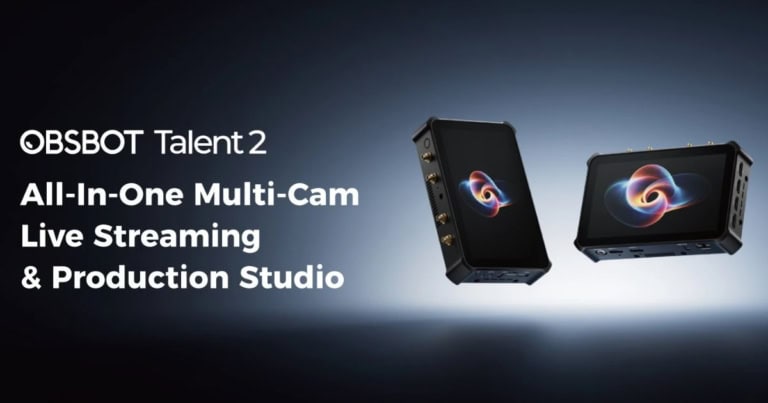
Something is inherently appealing when a company looks at an unnecessarily complicated process and asks a simple question: “What if we just put all of this in one box?” That is essentially what OBSBOT has done with their Talent 2: an ambitious all-in-one production system that brings video switching, recording, streaming, monitoring, graphics, networking, and camera control together in one spiffy little box.
Now I know what you may be thinking: it sounds like the kind of device that tries to do too much, since the Talent 2 boasts numerous features. However, after spending time with it, the bigger question becomes whether OBSBOT has actually managed to make all of those pieces work together in a way that feels practical.
For the most part, the answer is yes. The Talent 2 isn’t trying to be just another compact HDMI switcher; it’s meant to replace an entire production setup. Instead of having a collection of equipment, such as cameras, computers, additional monitors, and even more hardware to manage the recordings and PTZ cameras, the Talent 2 brings those responsibilities into a single portable unit.
That philosophy immediately makes the device more interesting than the specs might suggest, because the real advantage isn’t necessarily any one feature. It is the reduction in equipment, cables, and moving parts required to put together a serious production.
[Note: While I am reviewing this item independently and honestly, it should be noted that I received the Talent 2 from OBSBOT for the purpose of this review.]
OBSBOT Talent 2 brings endless possibilities in an itty-bitty case
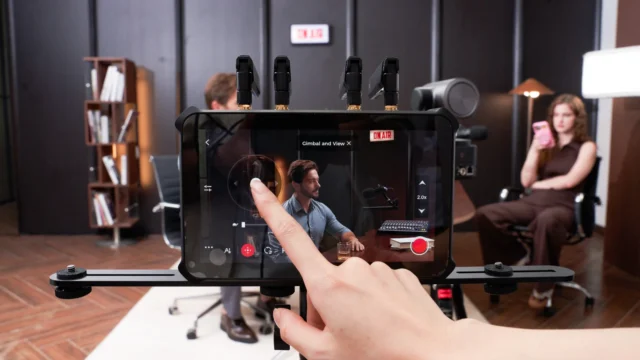
At the center of this OBSBOT product is a 7-inch 1080p AMOLED touchscreen, which serves as both the Talent 2’s monitor and its primary control interface. There’s no need to mess around with a ton of buttons, which would only serve to make the process vastly more frustrating; that’s why having a touchscreen as the interface isn’t just a smart move; it’s an essential one.
The touchscreen gives you a visual representation of the production while also providing access to switching, monitoring, and configuration tools. Rather than feeling like an accessory attached to a video switcher, the screen makes the Talent 2 feel more like a compact broadcast control room.
That becomes especially useful once you connect and use multiple cameras for your production. The Talent 2 supports four HDMI inputs, two USB inputs, and up to ten IP video sources through technologies including NDI, SRT, RTSP, and RTMP. Huge shout-out to my tech-savvy friends for explaining half those words, but it really boils down to this: the system can handle up to 16 video sources, which is insane if you think about it.
For a small interview production, that may be considerably more capability than you need. As someone who uses one, maybe two cameras or inputs at a time, I would never use the Talent 2 to its full capacity.
However, for larger events that require many cameras or other inputs, it opens up new possibilities. A producer can bring in traditional cameras, network-based cameras, computer feeds, and other sources without having to completely rethink the production every time a new type of video signal enters the equation.
The flexibility becomes even more impressive when the Talent 2 is paired with OBSBOT’s own cameras. Compatible cameras can be controlled directly from the Talent 2, including PTZ movement, presets, and AI tracking.
This is where the company’s larger ecosystem starts to make sense, as all the pieces integrate to simplify recording. Instead of operating the cameras separately and then returning to the switcher, the operator can control much of the production from the same interface. For a professional crew, that is convenient; however, for a one-person production, it can be transformative.
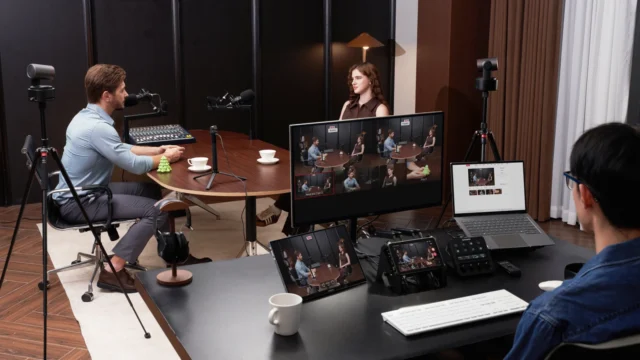
And the Talent 2 seems particularly well suited to smaller crews. Modern video production increasingly asks one person to do what once required several people. A single creator may be expected to operate the cameras, direct the show, manage graphics, monitor audio, and maintain the livestream at the same time. The Talent 2 cannot eliminate the complexity of those responsibilities, but it can reduce the equipment needed to do them.
Recording with the OBSBOT Talent 2
That philosophy also extends to the device’s recording side. The Talent 2 supports 4K recording and can capture up to four isolated sources, which may not sound particularly exciting until you actually need it.
Live productions are inherently unpredictable, especially when you have multiple cameras or recordings happening in the same place. The camera angle you choose in the moment isn’t necessarily the shot you want when you sit down to edit later.
As I’ve recently learned, for any kind of video output, more content from as many angles as you can get is better, because you’ll never know which shot will be the perfect one. ISO recording with Talent 2 lets producers preserve individual camera feeds, giving them much more flexibility in post-production.
That could be especially valuable for interview and podcast productions. Think of a three-camera conversation where you’re switching between the host and two guests. The finished livestream may look great, but the individual recordings provide another layer of creative control afterward. A producer can revisit a reaction, create a different edit, or reframe a moment without being locked into the decisions made during the live broadcast. In that respect, the Talent 2 isn’t simply a livestreaming device. It is also becoming part of the post-production workflow.
The 4K capabilities make that flexibility even more useful. The Talent 2 supports production up to 4K/60fps; however, not all HDMI inputs support the same resolution. While this technology offers 16 video inputs, only 6 sources can output 4K, while the rest are standard HD. That isn’t necessarily a problem, but it is an important consideration when designing a multi-camera setup. Anyone expecting to connect 16 4K cameras and treat all the inputs identically will need to rethink that assumption.
Still, the overall video capabilities are impressive, particularly when combined with the device’s networking options. The Talent 2 supports Wi-Fi 6, 2.5Gb Ethernet, and cellular connectivity, including 5G support through its connectivity system. It also supports network bonding, allowing multiple connections to work together.
For a studio production with a reliable wired connection, this may seem excessive. For someone working at a theater, convention, sporting event, or other location where internet reliability can be unpredictable, it becomes much more meaningful.
Anyone who has ever tried to livestream from a venue outside their established studio knows the internet connection advertised and the internet connection you actually receive can sometimes feel like two different things. Multiple connectivity options give Talent 2 important flexibility. It is not the sort of feature that makes for the most exciting promotional video, but it is precisely the kind of feature that can save a production when conditions aren’t ideal.
OBSBOT creates an all-in-one super tool
OBSBOT has also put considerable effort into making the Talent 2 useful as a graphics and production tool. Lower thirds, titles, picture-in-picture layouts, timers, scoreboards, and other production elements that will seriously up your game can be managed without relying entirely on a separate computer.
Again, the individual functions aren’t necessarily revolutionary. What makes them useful is that they live inside the same system handling the rest of the production, again eliminating the need for multiple tools. That all-in-one approach is really the Talent 2’s greatest strength. Every time OBSBOT adds another capability, the appeal of the system becomes less about replacing one piece of equipment and more about replacing several at once.
However, that ambition can become a weakness. The Talent 2 is a sophisticated device, and sophistication inevitably comes with a learning curve. A simple switcher is easy to understand because its purpose is obvious: connect cameras and switch between them. The Talent 2 is asking the user to understand sources, scenes, recordings, network configurations, graphics, streaming destinations, camera control, and much more. Someone who simply wants to press a button and switch between two cameras may find the system unnecessarily elaborate. For the intended audience, though, that complexity is arguably the price of admission rather than a flaw.
The physical design reinforces that this is meant to be taken into the field. The unit weighs under two pounds before accessories and supports dual NP-F batteries, including hot-swapping. That is a particularly thoughtful feature for mobile productions because battery replacement doesn’t necessarily have to interrupt the show.
Once you add batteries, cables, and other accessories, the Talent 2 isn’t something you will casually slip into a pocket, but compared with assembling an entire portable production system from individual components, it remains remarkably manageable.
Final thoughts on the OBSBOT Talent 2
For some, the price makes the purchasing conversation a bit more complicated. At $2,099, the Talent 2 is a serious investment. It doesn’t compete with someone looking for an inexpensive way to stream a webcam to YouTube. Instead, it targets creators, broadcasters, and production teams who need considerably more control and flexibility.
That price also needs to be considered in the context of what the device replaces. If the alternative is purchasing a switcher, capture hardware, streaming computer, monitor, camera controller, recording equipment, and networking accessories separately, the Talent 2 begins to make considerably more sense. It may not be cheap, but the value proposition changes when you compare an entire production system rather than a single piece of hardware.
However, for all the pluses, there are a few things to know before making such a large purchase. The batteries aren’t included, which adds another expense for anyone planning to use the Talent 2 away from a wall outlet. The differing capabilities of the HDMI inputs require planning for 4K productions, and users who rely heavily on equipment from different manufacturers may not get the same level of integrated camera control they would with OBSBOT’s own ecosystem.
The most impressive thing about OBSBOT’s latest production system isn’t that it can stream in 4K, record multiple isolated feeds, connect to numerous video sources, or control compatible PTZ cameras. Plenty of professional equipment can do each of those tasks on its own. What makes the Talent 2 interesting is that it attempts to make all of those functions part of the same workflow.
For a solo creator, that can mean fewer pieces of equipment to transport and operate. For a small production crew, it can mean fewer people needed to manage the technical side of a show. For a professional production company, it can become a compact mobile system that provides a surprising amount of broadcast functionality without requiring a truck full of equipment.
The Talent 2 won’t replace every professional video production system, and it isn’t meant to. But it does something arguably more interesting: it makes sophisticated production increasingly accessible without forcing creators to build a sophisticated production infrastructure from scratch. That makes the OBSBOT Talent 2 an impressive piece of technology because it brings an extraordinary number of production tools together without making the concept of an all-in-one system feel like a compromise.
Also check out: Reviews and podcasts from Cosmic Circus